— Teach Computing Cheshire & Wirral (@ComputingHubFT) March 10, 2023
Tweet from @ComputingHubFT
Coming soon from me, three short, online sessions focussing on some really powerful techniques you can use in the computing classroom, on behalf of TeachComputing, Cheshire and the Wirral hub.
Mon 27 March, 4-5pm online: Storytelling and analogy.
In his book Why don’t students like school? Daniel T Willingham says stories are treated as preferential information, they help with retention. Learn how to bring stories and analogy into your computing teaching to improve retention. Book here: CA303 F79
Cross-topic teaching…
Learners understand a subject much better if the links between concepts are made explicit, and they are encouraged to make their own links either within the subject or across the curriculum. We discover some links that you can make, and activities that make these links explicit.
Wed 29 March, 4-5pm online:Cross-topic and synoptic teaching:
Misconceptions can seriously hinder learners’ progress, and studies have shown that teachers who are aware of common misconceptions and actively seek to address them are more effective. Join us to become more misconception-aware. Book here: CA303 F78
If you are grateful for my blog, please buy my books here or buy me a coffee at ko-fi.com/mraharrisoncs, thanks!
A lot of column-inches and a bazillion frantic tweets have been bashed out recently about the AI tool ChatGPT: the public, text interface to a Large Language Model (LLM) created by the OpenAI consortium. Originally a not-for-profit body which boasted Elon Musk as one of its original investors, OpenAI is now unashamedly for-profit and in November 2022 launched ChatGPT, a language model built on GPT3, the third iteration of their “generative, pre-trained transformer” software. This tool can process natural language text and respond with natural-sounding text back. It also remembers conversations, hence the “chat” element, and this is what makes it more powerful than previous iterations: you can refine your query over several inputs to get better results.
Advertisements
AI services like ChatGPT join a long line of technologies to have been described as both “dangerous”, downsides from its use as a class cheat’s superpower, to a phishing and identity fraud weapon. it’s “the end of assessment as we know it’ because “many of the problems we set in secondary school can now be solved by apps… It is not a good sign that we still teach and test mathematical material in such a routine way that free off-the-shelf systems like these can handle lots of it with ease’ – economist Daniel Susskind in his book A World Without Work.
But we’ve been here before. The internet was going to spell the end of academic assessment in the 90s. In truth it didn’t change much, except for democratising information so you didn’t need to be in school to learn. If we’re honest with ourselves, outside of controlled conditions such as the exam hall, there are a myriad ways to cheat already: copying from others, searching online or using an online service to do your homework for you, sometimes called an essay mill. If a piece of work is important (such as assessed coursework or “controlled assessment” work) then the teacher should already have some skill in plagiarism-checking. Online services such as Turnitin are widely used, but I’ve always found simply asking a student to explain their work, called a “viva voce” interview in academia, does the trick. You may not need to do this with 100% of submissions, just a 10% check might be sufficient to deter serious plagiarism.
And if you absolutely must have confidence the submission is the students own work, then conduct a test in controlled conditions with no devices allowed. But only a small number of pieces of work (often just a summative test of required knowledge to progress to the next stage, e.g. the GCSE’s and A-levels in the UK or the college-entrance-assisting AP tests in the US, and the final exams of a degree course) over a student’s lifetime should require this level of scrutiny. Everything else should be treated as formative and afforded a lesser degree of validity and therefore require less strict control.
Most of my students work is either self- or peer-assessed. A mixture of online self-assessment using platforms like Quizlet (most subjects) or SmartRevise (Computing and Business only at the moment) get the bulk of the feedback done cost-free, and the rest is largely done by the students with lots of guidance from me. I’m glad the UK never adopted the American high-school system of grade-point average (GPA) scoring, not least because it penalises poor early performance which is unfair to immigrants and those with health issues, and is linked with self-esteem issues, but because it makes every piece of work high-stakes and high-cost to the teacher. When both teacher and student are stretched to the max by tests every semester, there is no space to relax and enjoy the journey. And pity the student who gets a C during the grief of a bereavement which prevents them getting the required GPA for their college of choice no matter what they do next. (If you’re in the UK, thinking “glad we don’t have the GPA system here”, count how many controlled tests and data drops you must do each year, and ponder a moment).
Advertisements
Let’s remember the purpose of assessing work. All assessment is a surrogate for what we want to know: what is in their heads. Assessment is not an end in itself, the mark should reflect some measure of achievement that helps both teacher and student understand how to make progress. Let’s not forget that what we want to achieve is an improvement in learning, what’s in their head when they leave school, not what they wrote in a paper when they were eleven or fifteen. As Tom Sherrington writes:
If testing is going to have an effect on the learning process, it needs to have an outcome that will help students to develop a sense of themselves as learners and an awareness of what else there is left to learn.
As Daisy Christodoulou writes, the struggle, not the end product, is the point:
If a student struggles for an hour over an extended piece of writing and then finds that a computer has surpassed it in seconds, it is entirely possible they will feel demotivated. What they need to hear from adults is don’t worry, your work is of value, you’re on a journey and you are developing your own writing skills.
Design your assessments so they create actionable feedback, not just test scores. Furnish the students with marking rubrics ahead of the assignment, and get them to mark themselves against the rubrics before handing in. If they’re using ChatGPT at home to write essays, they might be short-circuiting part of the process, so have the class critique each-others essays in class afterwards. Create model answers or “what a good one looks like” WAGOLLs they can mark themselves against, or choose a student’s answer that is high quality and work with the class to determine what makes it so. Joe Kirby’s seminal 2015 blog post “Marking is a Hornet, Feedback is a Butterfly” is still my go-to article for in-class feedback ideas that can be re-purposed in the ChatGPT age, even to make the most of so-called “plagiarised” work.
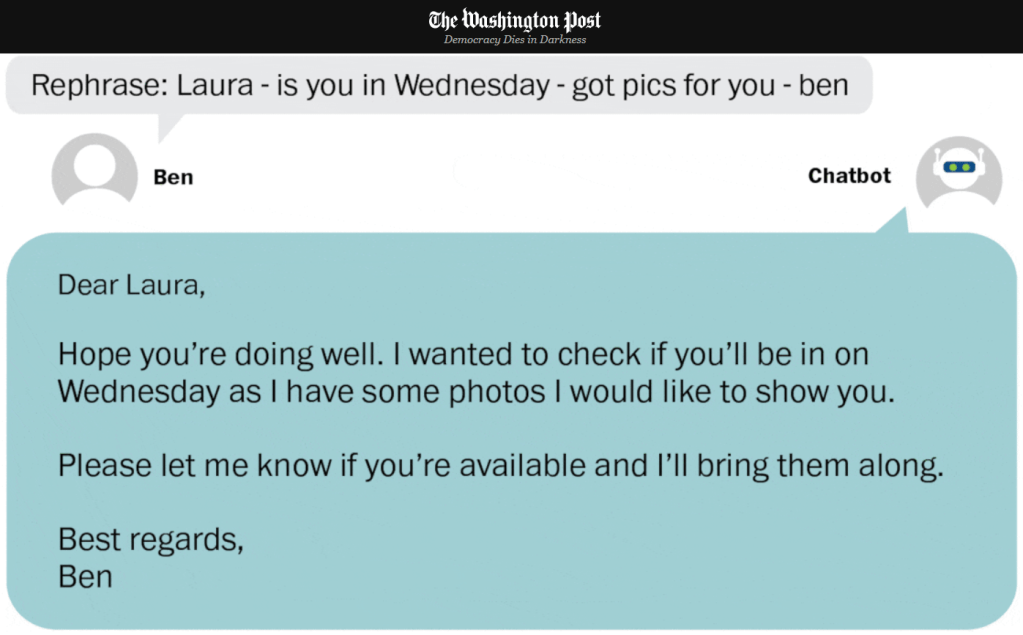
Back to ChatGPT and the “plagiarism panic”. Too often we forget the upsides of a new technology in all the swirling panic about its dangers. For LLMs like ChatGPT these include levelling the playing-field for people with disabilities or assisting people for whom English is an additional language. Make sure your EAL students have access to it and know how to use it. Discuss with your SENCO how students might use it to overcome learning difficulties like dyslexia and dyspraxia. As this article explains, it’s already helping a landscaper with low literacy write professional-sounding emails to customers (see image above), and writing assertive letters to a landlord on behalf of a shy tenant regarding a water leak (the leak was fixed in 3 days). We demonise this technology at our peril.
And with any luck, ChatGPT might bring down the GPA system and its pale imitations in the UK, with all the inequities those systems perpetuate. Which can’t be a bad thing.
If you enjoy my blog, why not buy me a coffee? And I talk much more about AI in the context of the Computer Science GCSE in my book.
If you are grateful for my blog, please buy my books here or buy me a coffee at ko-fi.com/mraharrisoncs, thanks!
Last Saturday, 25th February I spoke at “I Love Computing 2023” a FREE Festival of Computing CPD in London, details at bit.ly/lovecomp23.
I was honoured to be among some of the biggest names in Computing education today, including Jane Waite, Sue Sentance, Miles Berry, Paul Curzon, Phil Bagge and Elli Narewska.
My two talks were on the following (after the ad break…) NOW WITH PDF LINKS TO THE CONTENT.
Advertisements
The Computing Ofsted Research Review and preparing for a Deep Dive
Understand what OFSTED are looking for. What are declarative and procedural knowledge anyway? How do I deliver the National Curriculum at KS4 if they don’t all take the subject? Alan served on the working group that created the Ofsted Research Review and has interviewed successful OFSTED Deep Dive recipients. Attend this talk to help prepare for OFSTED and be relaxed about their next visit. UPDATE – PDF available to download below.
Beyond Mnemonics – teaching for mastery through PCK – a GCSE Computer Science booster
Do you feel you are teaching for “surface learning”? Are you using tricks and schemes such as mnemonics to get them through the exams, and would rather teach for mastery but don’t know how? Alan’s book “How to Teach Computer Science” is all about the hinterland, the background knowledge that illuminates the subject and helps you teach it with confidence, and pedagogical content knowledge (PCK) – the “how to teach” knowledge that helps you succeed. Alan will explain why this “hinterland” is important and what PCK is and how to acquire it, and how to use both for mastery learning. UPDATE: PDF available to download below:
All attendees go into the prize draw for a copy of my book, and there are other, far more desirable prizes available too! At the event I will also reveal a discount code for 30% off either of my books, generously donated by the publisher John Catt Educational (part of Hachette). Update – read my PDFs for the code, available for one more week!
Video recordings of my talks from last year’s online conference are saved here, where I spoke on the “hinterland” and on demystifying computer networks, and if you enjoy those, I hope to see you in Tottenham this Saturday.
If you are grateful for my blog, please buy my books here or buy me a coffee at ko-fi.com/mraharrisoncs, thanks!
Learners need a secure mental model of computation
PRIMM
If you haven’t done so already, you should study the “PRIMM” model of programming instruction, which suggests five stages of interacting with new code: Predict, Run, Investigate, Modify, Make. You can read more about PRIMM in the Teach Computing quick read at helloworld.cc/primmquick and on the blog primming.wordpress.com.
The block model
During the “I” phase of PRIMM, while investigating the code, students should be encouraged to ask questions about it to deepen their understanding. You can prompt them with questions such as:
What would happen if you swap lines 2 and 3?
What would happen if you give it input of ___?
What if you change the symbol on line 5 from > to < ?
Line 5 shows a condition-controlled loop, why do we call it this?
What will make the loop end?
Advertisements
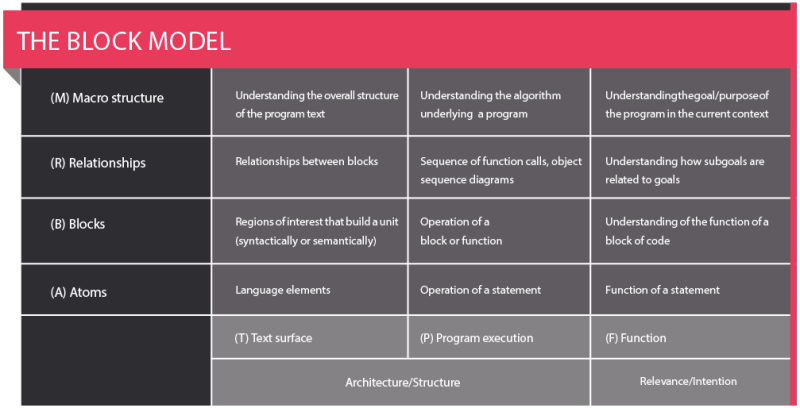
We can check we are encouraging valuable thought across the whole range of programming skills using an approach called the “block model”. Devised by Carsten Schulte in 2008, the block model has a grid with two axes, one showing the size of the programming element under consideration, and the other the distinction between the structure, execution and function of the program:
If we map our questions and activities onto the block model, we can then identify any gaps. Adding more tasks in those gaps will ensure that we cover the whole grid. In this way we ensure students are thinking hard about the full range of skills required to thoroughly understand a program.
The block model is also explained in “Computer Science Education” edited by Sue Sentance and the new version is available now for around £25 here amazon.co.uk/dp/135005710X. I summarise this principle and many other programming pedagogies in my book “How to Teach Computer Science” available for under £15 here: httcs.online.
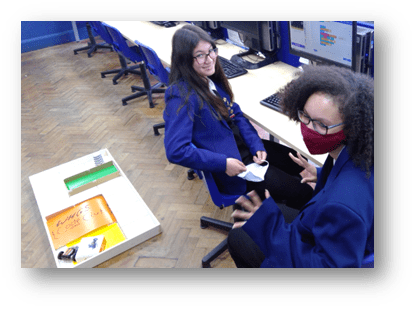
Physical Computing provides engaging, relevant, and inclusive learning experiences and helps develop programming skills while being creative and collaborative. Code makes something happen in the real-world, not just on a screen. Learners (particularly girls) find physical computing engaging.
The Bit:Bot buggy allows code to make something happen.
Physical computing devices take some time to set up, and can add complexity and behaviour challenges to a lesson, so take some time to think through these before using them in class.
Getting Started
Start small. Focus on a small cohort, maybe an after-school club, until you get up to speed.
Use the training and support available, there are physical computing courses on TeachComputing.org and help is available from your hub
Choose a device and activity based on context, setting and need.
There are five main categories of device, and the most common are listed below:
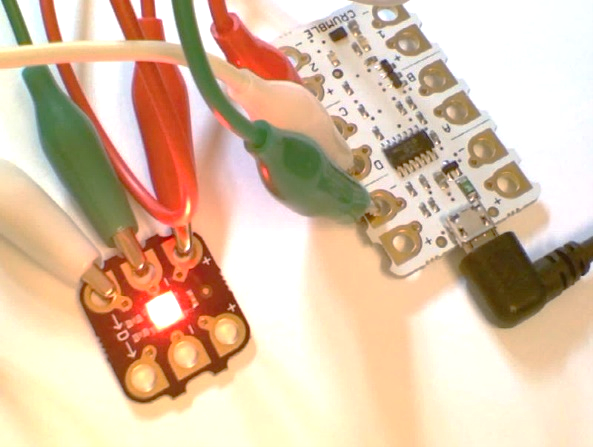
Crumble is an “Embedded Board”
Packaged Electronics such as “Snap Circuits” – these require a lot of electronics knowledge and are best suited to DT projects.
Packaged programmable products: Sphero, Bee-Bot, Lego WeDo/Mindstorms and VEX are simple to set up and get you straight to the programming, good for Primary settings.
Peripheral boards such as the MaKey MaKey connect to a computer to add interactivity, but cannot be unplugged and run standalone. Simple and fun!
Embedded boards like the Micro:Bit, Crumble and Raspberry Pi Pico have a microprocessor onboard that you program via a computer, but they then run the program independently, so can be disconnected. Use these to control buggies, create musical instruments, name badges and weather stations…
General purpose boards like the Raspberry Pi 3, 4, Zero W and W2 are actually whole computers that run a full Linux-based GUI operating system. You connect one to a monitor, mouse and keyboard and use it like a computer, but it has lots of interfaces for connecting electronic equipment. You can do almost anything with a Pi, but the learning curve is steeper than the above devices. They run Scratch, Sonic Pi and Minecraft with a Python interface, so you can write “mods”, or connect a camera to make a digital photobooth, the possibilities are limitless!
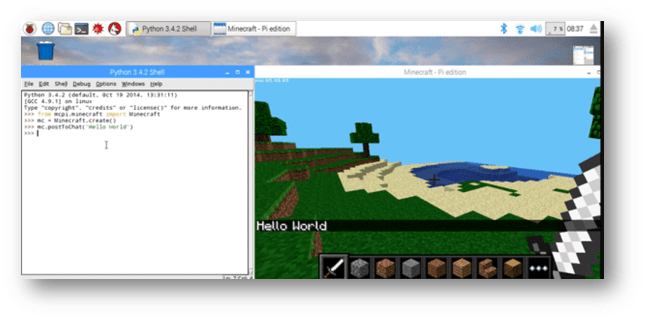
Minecraft Pi comes with a Python interface where students can write their own Mods!
And if you like this post, remember to thank me with a coffee, and then go and buy one of my books, “How to Teach Computer Science” is packed with teaching ideas like this. Thanks!
If you are grateful for my blog, please buy my books here or buy me a coffee at ko-fi.com/mraharrisoncs, thanks!
As author of “How to Teach Computer Science” (see how early I got the plug in?) it’s probably right that I post about my foray into Mastodon, the “Twitter alternative” that everyone is talking about (again, more on that later). I will try to keep this post updated over the next few weeks so check back often. If you like this post, consider bunging me a coffee or buying my book. Also forgive the occasional ads on the page, this is not my day job. Thanks!
What is Mastodon?
It’s microblogging software, running on thousands of separate servers. You sign up and can share posts or “toots”, that others can see. You can follow people and use hashtags, much like Twitter (and also very much not like Twitter in all the right ways, which you will understand soon).
In short, it’s software. It’s not a service/website/platform/publisher like Twitter. It has no teams of content moderators. This vital distinction is of utmost importance, because it’s underlies many complaints made by new users, who have made the switch from the birdsite. Essentially, Mastodon is software that runs on a server and provides a microblogging platform to its users. A technical person called a “sysadmin” has installed the software on a server and made it available to you via the WWW. That sysadmin is wholly responsible for the server “instance” they have created. Users sign up on the web interface through a normal browser, or on a mobile device can download the Mastodon app, or alternative apps like Tusky.
Note: I will use the terms “server”, “instance” and “domain” interchangeably in this post because if you’re new to the service the distinctions are really not important.
Each instance exists independently of the others and should be considered a separate community, with its own rules and etiquette, although they do talk to each other (see later). Take the time to learn those rules because the premise of a Mastodon instance is that it is a collaborative, supportive community of like-minded people, with no agenda, no ads and no algorithms pushing content. Just like the early internet servers were, on Fidonet, Usenet, IRC and everything else that used this model long ago! (Aside: I was sending emails and using Usenet in 1986 at Sheffield Uni. I’ve seen these services come and go a few times. More on that later).
Advertisements
Which server do I choose?
You’re probably here because someone you know has suggested you join mastodon. So maybe join the server they are on. If they have shared their full mastodon username, the server is the bit after the username, i.e. my full username is @mraharrison@mstdn.social so my server is available on the web at mstdn.social. If that server is closed to new signups (the number of people signed up across the “fediverse” has doubled in the last week) then go with a similar one, and you can start looking here.
I am on mstdn.social whose server rules can be found at the “about” page here mstdn.social/about and you can see the rules listed as follows:
Sexually explicit or violent media must be marked as sensitive when posting.
No spam or advertising.
No racism, sexism, homophobia, transphobia, xenophobia, or casteism.
No incitement of violence or promotion of violent ideologies.
No harassment, dogpiling or doxxing of other users.
No illegal content.
That all sounds great, but even more information is below the rules. I can see over 100 other instances that are banned from connecting to this instance, and read the reasons for doing so. “Racism”, “illegal content”, “harassing trans people” and “conspiracy theories” are some of the reasons listed by @stux, my sysadmin for preventing other servers from connecting to this one. Stux is a good guy who runs this site for a living, so I have PayPalled him some money. Your server admin can be found on your server’s “about” page, and you should consider helping because they usually run the site purely on voluntary donations.
Browsing the about page will make the culture of this instance clear to you, and reveal the outlook of the sysadmin(s) which is kind of important, so you can decide whether you want to join the community.
Advertisements
What’s “federation”?
So each instance behaves like a community, but that’s no good if your friends are all on other instances, right? OK that’s where federation comes in. Each instance will “federate” with all other instances: you can follow others and your posts will be seen by others on other instances and vice versa, within certain parameters. We saw above that a sysadmin will judiciously block other servers based on their federation policies, and that’s great to keep this instance reasonably safe. But generally speaking, your instance will seamlessly talk to all other instances where your friends are. Here is a handy flowchart to show how federation works, courtesy of user @cassolotl@cybre.space :
How do I find people to follow?
Start with someone you know, and browse to their profile. I am here: mstdn.social/@mraharrison . If you click “following” and “followers” you can see who I follow, and quickly follow them using the little “add person” icon to the right of their names:
You can also search hashtags, and if you’re reading this because you are in my UK teaching network, you probably want to click here and follow some people posting with the #EduTooter hashtag. Just type #EduTooter into the search box on the site or app, and then follow some of the tooters that come up! (Sorry about the word “toot”, I thought “tweet” was silly, but here we are…)
Trying hashtags like #medicine, #grungemusic #crossstitch usually comes up with some people to follow, but this process may be slow and take a few weeks before your timeline is as busy as the birdsite was. Bear with it, this is because there is no algorithm pushing content to you, which is why you came here, right? To be free of the corporate firehose of questionable information? Right?
Note: Mastodon has a “Lists” feature just like the birdsite, so check that out, when I have any useful lists of EduTooters to share I’ll share them here, come back often!
Can I use an app?
Yes. I recommend signing up through the web browser interface, it’s just much easier to get started that way. Some features are not available on the app and the screen real-estate needed to get set up easily is substantial. But once signed up, there is an “official” (i.e. provided by the not-for-profit German company that looks after the Mastodon open-source software) app called Mastodon but also some “unofficial” ones. I’m trying Tusky now and running both apps to check them out. Others may be available.
How do I stay safe?
You have checked the moderation policies of your server instance, right? So you know what content is allowed and what isn’t. Firstly, be a good member of the community and follow those rules yourself. Be careful, many server rules require Content Warnings for certain things, e.g. mstdn.social requires a CW before mentioning violence. Just add a CW in the app or on the web by clicking “CW” below the text box. Follow all the other rules as well, to be a good community member. (This is how the early internet was, let’s recreate the good times of community!)
If you get harassed, attacked or any trouble, you need to know how to block a user, block a domain or report to the admin. Click the 3-dots on the right of the action icons below the toot. In the pop-up menu, choose an action from Mute, Block user, or Block domain. Obviously “block domain” will be greyed out on your own domain.
(I’m grateful to Alex for the image – follow him here).
How do I support my sysadmin?
Remember, Mastodon is run by volunteers. I’ve written about my host above and explained that I have sent a donation by PayPal to @Stux, many of you may be on mastodon.social which is run by the lead developer of the Mastodon software, Eugen aka @Gargron. Whichever server you are on, you should definitely support your admin with a small payment: whatever you can afford, as this ensures the platform remains usable, and stays out of the hands of the big corporations. Click the “About” page on your server home page to find out how to help.
If you enjoyed this blog or found it useful, remember I too rely on donations! I wrote two books called “How to Teach Computer Science” and “How to Learn Computer Science” available here, if you have a child aged 14-21 learning computer science, why not get them a copy of the latter? Or you can buy me a coffee below. See you on Mastodon!
If you are grateful for my blog, please buy my books here or buy me a coffee at ko-fi.com/mraharrisoncs, thanks!
My new book “How to LEARN Computer Science” is out now, at Amazon and JohnCattEd, and you have a two chances to get hold of a free copy…
Like and Retweet my tweet here or Like my Facebook post here or here, or my LinkedIn post here. This will enter you into the prize draw and SIX winners will receive a free copy.
BOGOF! Send proof of purchase of my first book “How to Teach Computer Science” dated today or later, and I will send you a free copy of #htLEARNcs (limited to the first SIX applications).
Book now available in Amazon and at the publisher John Catt Ed
I’m very excited about this book, and hope your students are too. It will be available soon on the Hachette store too, thanks to JC’s deal with them, and bulk discounts for your class will be possible. So why not get a copy for yourself now? The foreword is written by my good friends Craig Sargent and Dave Hillyard of Craig’n’Dave and I am very humbled to have had their support during the creation of the book, and their wringing endorsement on page 1.
The student book is being printed as we speak, and is available for pre-order on the John Catt website and on Amazon. The story of the book is told on my earlier blog post here.
Advertisements
I am delighted to share that the book’s Foreword has been written by my good friends Craig’n’Dave, who have been very supportive throughout this project, and inside the book I very much recommend their products especially the course companion SmartRevise, not because they paid me (they haven’t!) but because I use it myself with great results.
The book is not a textbook nor a curriculum primer, but hopefully a riveting read for ambitious students, illuminating the topic and suggesting some stretching activities. I have taken all the good stuff from the first book (How to Teach Computer Science, available here) that is relevant to an audience of GCSE students themselves, and added lots of new content.
Here are some highlights, I’m proud of how it turned out, see for yourself from these extracts, and pre-order at the links above.
Extract from Chapter 4 of “How to Learn Computer Science” available for pre-order now.
Advertisements
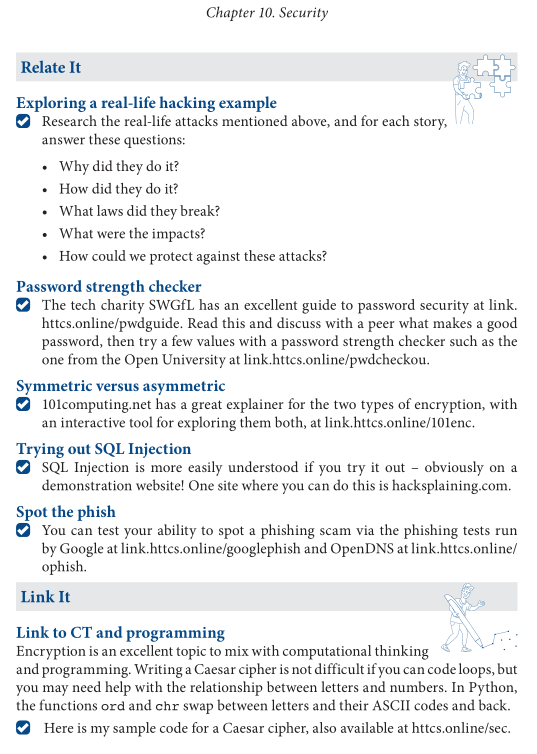
Extract from Chapter 10 of htLEARNCsExtract from Chapter 11 “Issues and Impacts” showing a “hinterland” story and subsequent “fertile question” prompt.
Currently the book is scheduled for availability on 9th Sep and costs just £12. I asked the publisher to keep the book affordable for students, and I’m glad that’s been possible. There may be bulk discounts available in time, I’ll update you on this blog if that happens.
Don’t forget, this book is the student companion to my original “How to Teach Computer Science” also available from John Catt, Amazon and all good online sellers, links available from the main page of this blog, so why not order both ready for the new school year?
If you are grateful for my work on this blog and the books I have written (remember my royalty is less than a quid of the cover price!) then feel free to show your gratitude here. Thanks!
If you are grateful for my blog, please buy my books here or buy me a coffee at ko-fi.com/mraharrisoncs, thanks!
It’s coming… that time we all catch up with family and friends, have a well-earned break, and put our feet up with a brew and a book. That book could be on me, if you enter my prize draw for a copy of “How to Teach Computer Science” Simply reblog this blog, RT my tweet here, or Like this post on Facebook to enter the prize draw. Three winners will get a copy in the post after the competition closes at Noon on Sunday 24th July. Thank you for spreading the word!
BREAKING NEWS: How to LEARN computer science, the ambitious student’s guide to studying computer science, will be out this September!
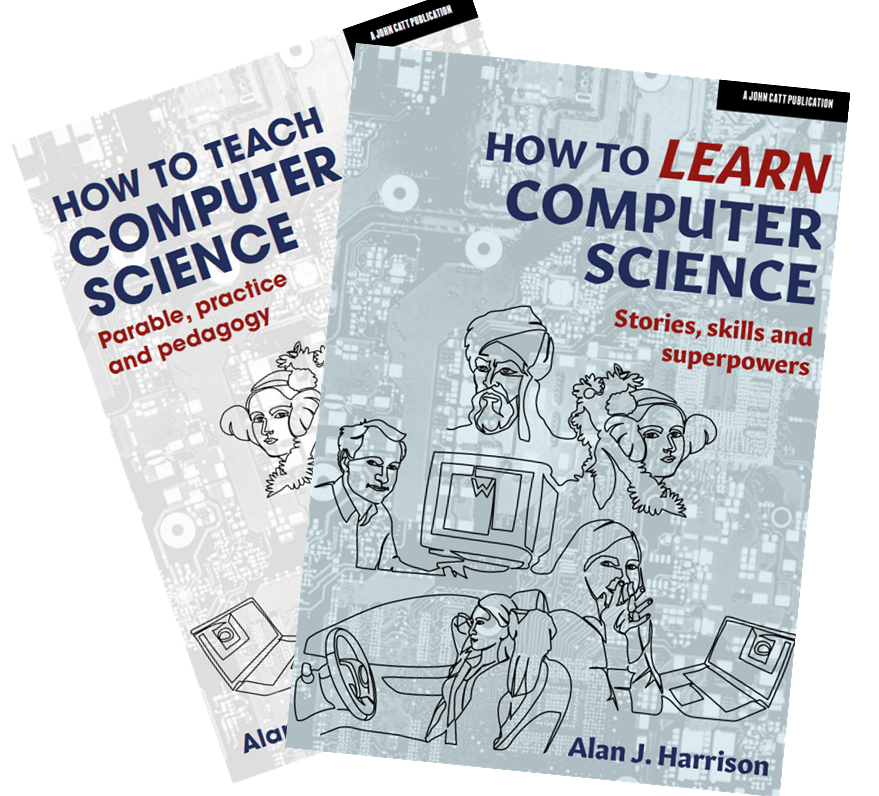
Book covers, How to Teach Computer Science and How to Learn Computer Science
The title says it all, please for the love of children, turn off password expiry on your students’ accounts. Here’s why…
Advertisements
I was an Information Security (Infosec) consultant before I was a teacher. The prevailing wisdom up in the 20th century was that passwords should expire regularly, so that any compromised password quickly became useless. The password-thief would lose access once the rightful owner changed their password. This made sense at the time, most users had only one or at most a handful of passwords. They could cope with changing them once a quarter or so. That was then.
Forward to 2022 and we all have dozens, even hundreds of passwords. If they all expired quarterly, not a day would go by without one changing. But they don’t. We have access to password keepers, and most browsers offer to save passwords in an encrypted database. Our sensitive data is kept behind two-factor authentication (2FA) or multi-factor authentication (MFA) processes. We don’t have to remember a password that changes every 90 days or less. So why do it to the pupils?
I teach Year 7 upward, that’s aged 11 plus. Some of the pupils I teach arrive in with a reading age of 8 or less. My colleagues in upper primary who begin teaching pupils to use Office or Google Docs are teaching pupils with a reading age of 5 or 6. This is before we consider SEND needs such as visual impairment, motor control issues and ADHD to name but a few that are relevant here. So you can imagine the challenges they face. When password expiry came around, the conversations often went like this:
Ah, your password has expired. Right let me help…<sigh>
In those two boxes you have to type a new password.
No it can’t be the old one again. Oh, you already tried that? Right well now you have to type in your old password again.
No, I know I said you needed to type a new password but that comes next, first you need to type your old one in again, or it won’t let you type the new one.
Now, the new password needs to be at least 8 characters long, include a capital and a number, and be different to all your old ones.
If didn’t work again? Did you follow the rules? Ah, I see you didn’t use a capital, you need to press Shift for that, remember?
Right, maybe you didn’t type it exactly the same in both boxes.
No you’ll have to type your old password correctly again to have another attempt at choosing a new one.
OK so we’re ready to choose a new password again, can you remember the rules?
No those two passwords are not the same length, I can see from the length of the asterisk strings. Can you go back and do it again?
Oops, you hit Enter and it’s asking for old password again. Just do that first then try to get the new password the same twice this time.
Right two passwords the same length, are you sure they are the same?
Oh dear it’s still rejecting the new password. Did I mention it cannot include your name? You included your name? We can’t do that.
Yes, you need to type your old password again to try again.
One capital, at least eight characters, and a number.
Yes, they look the same length, are we ready to go?
Great job! you changed your password. Now write a hint in your planner, something to remind you what the password was, but not the whole thing, OK?
<writes hint>
<1 week later>
You can’t remember your password? Does the hint not help? OK then I’ll reset it. You’ll need to choose a new one, it will need to be at least 8 characters long, include a capital and a number, and be different to all your old ones….
repeat for at least half of every Year 7 class for half of the year and more than a handful of students every week, back when passwords expired in my school. But that was then…
Advertisements
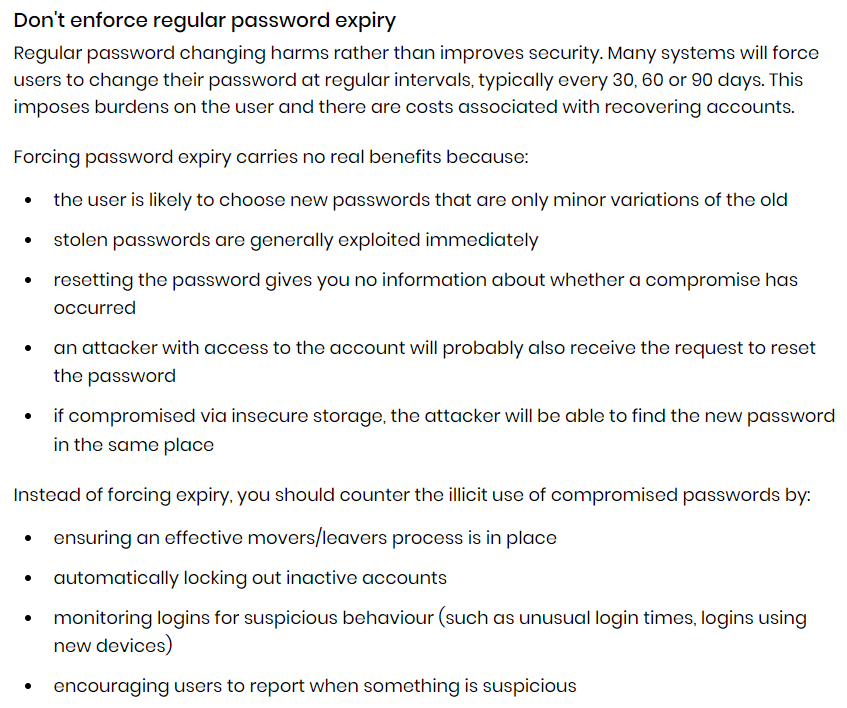
I successfully used my prior experience as an Infosec (Cybersecurity) consultant to persuade my IT team to turn off password expiry. Because it’s not necessary on student accounts, and strongly discouraged on staff accounts too. Who says? The National Cyber Security Centre (NCSC). In an advisory article entitled “Password policy: updating your approach”, the UK government’s dedicated Cybersecurity unit wrote this:
NCSC Article “Password policy: updating your approach”
“Forcing password expiry carries no real benefits because:
the user is likely to choose new passwords that are only minor variations of the old
stolen passwords are generally exploited immediately
resetting the password gives you no information about whether a compromise has occurred
an attacker with access to the account will probably also receive the request to reset the password
if compromised via insecure storage, the attacker will be able to find the new password in the same place”
I could add other reasons to the above, regular password expiry causes users to write down their passwords, or just forget them. Now they no longer expire I don’t have the torturous “password expired” lessons and pupils no longer use “I forgot my password” as an excuse for missed homework. I gave them some skills to choose a strong, memorable password and introduced detentions for forgotten passwords after a while, as explained on this blog post. And nothing terrible has happened.
Please. Stop expiring your passwords.
My book “How to Teach Computer Science” is available for just £15 or less, see httcs.online for details. Tweet me @mraharrisoncs with comments.












 How to Teach Computer Science
You must be logged in to post a comment.