Categories
Uncategorized

Year 7 Intro Booklet

Secondary Computing teachers are all painfully aware of the “Comptuer skills deficit” that affects many children arriving in year 7, due to the lack of experience with a desktop computer.

This is a work in progress but it’s my booklet of skills that I am composing for a new set of lessons (about 3 hours in total) for year 7.

Please fee free to copy and improve, just acknowledge me if you share onwards (CC BY-SA 2.0). I will update this over the coming weeks.

Categories
Uncategorized

#CSHinterland Book Update

I’ve been lucky enough to get some time to write the book this summer. Thanks in part to the fact that I’ve pretty much planned the curriculum over the last two years, and I know that there is a whole set of new resources available from the NCCE and as we speak they are being recorded as narrated lessons for the Oak National Academy, I don’t feel under pressure to plan extensively for September.

So here I am in France, having driven straight here, we stayed in our car as much as possible, taking a picnic for the journey and drove all the way in one day, just stopping for fuel and coffee from a machine.

I have the best view of any office, and in a break from the book I daubed the attached picture of my view. Trust me, the real view is even better than this:

In author world, I have written about 3.5 chapters of a planned 13, if you want a word count I am up to 15,000 and I have to say I’m really excited and pretty proud of the way it is shaping up.

As discussed in the previous post, the target audience is teachers of Computer Science, the subject matter is centred around the typical GCSE specification, and each chapter follows a similar pattern. I cover some of the hinterland of the subject: stories that link the topic to world events, to other topics in our subject and to other subjects in the curriculum, illuminating our beautiful subject and bringing it to life. Then I discuss some of the current research in Computer Science Education and how it informs CS-specific Pedagogical Content Knowledge: that secret garden of teaching know-how, PCK of which teachers of other subjects have a vast store they can draw upon, but is still immature and sparsely known by many Computer Science teachers, because our subject is so young and we must rely so heavily on non-specialists. Those teaching techniques that work and make us effective CS teachers, from post-it packet switching to pair programming. Finally each chapter covers some common misconceptions, so we can head them off before they take hold.

It should be an enjoyable read and although aimed at UK’s Computer Science GCSE teachers, it should be very useful to CS educators at all levels, but also accessible to students at KS4 (US 9th & 10th grade) up to undergraduates on a computing-related degree course.

Here is a sample from the chapter on Programming PCK.

When Peter Samson wrote his music player program for the TX-0 in 1959 (see Languages chapter), his “mind had merged into the environment of the computer”. With the advent of high-level languages, however, the capabilities of the computer have been extended far beyond basic arithmetic and logic, to include abstract data structures and complex algorithms to process them. It is no longer possible to hold in one’s head the entire computer. But to interpret, correct and write programs in a given language we must have a good understanding of the capabilities of that language, running on the machine in front of us. We say that learners must construct in their heads a notional machine.

A notional machine is the set of capabilities that a programming environment affords to the programmer. Understanding a notional machine enables a programmer to answer questions such as: What can this programming system do for me? What are the things it can’t or won’t do? […] What changes in the system does each of my instructions bring about as my program runs? How do I reason about what my program does?” – Sorva 2018

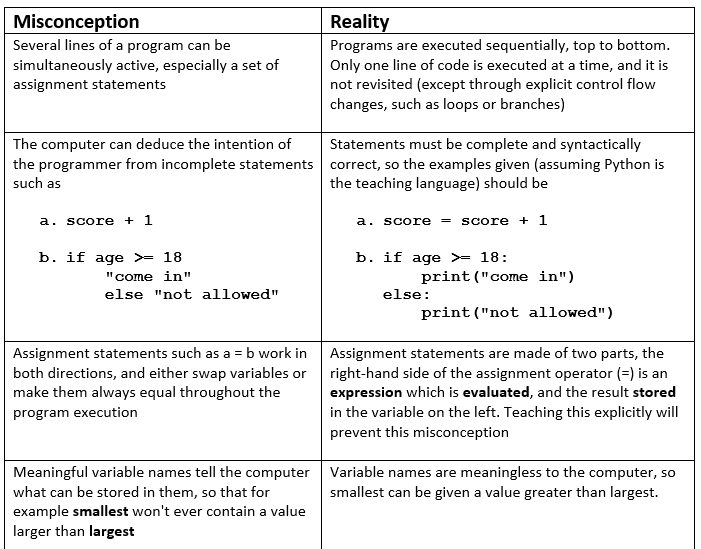
Without a notional machine in the mind of the learner, they don’t have a viable model of program execution. They can’t reliably predict what the computer will do with their code. This leads to misconceptions.

table of misconceptions

I’m really enjoying authorship, and there has been lots of interest from colleagues who want a copy of the book, from other educational content creators wishing to collaborate, and offers of proofreading, so thank you all.

All I need now is a name. The working title is CS Hinterland, but covering the PCK means it needs a new one, perhaps one of these? Feedback welcome here via comments on WordPress or on Twitter @mraharrisoncs, thank you. Publication is likely to be December, but who knows, it’s my first book so anything could happen!

Categories
Uncategorized

CS Hinterland – The Introduction

The book is taking shape. This is a draft introduction. I welcome feedback and crowdsourced ideas as discussed at the bottom of the piece.

Introduction
  • “Sir, what was the point of computers before the internet?”
  • “Miss, how does my browser know where Google is?”
  • “Sir, how do computers know 0100001 is “A” and not the number 65?”

This book is for every Computer Science teacher who has ever been asked that question: one they can’t answer but wish they could. It’s for new or aspiring teachers wishing to improve their subject knowledge and thus gain some confidence in the classroom. And it’s for experienced CS teachers who wish to hone their practice, in particular in the areas of explicit teaching, tackling misconceptions and exploring Pedagogical Content Knowledge (PCK).

We will explore some of the backstory to our subject – the Hinterland – those fascinating journeys into history or across the curriculum that make the subject come alive. We will go beyond the mark scheme to explore the subject knowledge behind the answers, giving you the confidence to discuss the subject in greater depth. We will discuss potential misconceptions that arise when teaching our subject, so you can “head them off at the pass”. And we will look at some teaching ideas for each topic: the Pedagogical Content Knowledge which tells us what analogies, questions and activities work well for a given topic.

The germ of an idea for this book was planted by this blog “Signposting the hinterland…” in which Tom  Sherrington explains that curriculum can be divided into “core” and “hinterland” where the hinterland is as important as the core, and serves the purpose of:

  • increasing depth: niche details about a particular area of study that deepen and enrich the core.
  • increasing breath: wider surveys across the domain of any curriculum area that help to locate any specific core element within a wider frame.

Sherrington quotes from an earlier blog by Christine Counsell which explains why the hinterland is important.

“The core is like a residue – the things that stay, the things that can be captured as proposition. Often, such things need to be committed to memory. But if, in certain subjects, for the purposes of teaching, we reduce it to those propositions, we may make it harder to teach, and at worst, we kill it. “

This book aims to assist Computer Science teachers in sharing some of that hinterland with their students, to enrich their studies, cement core knowledge in a wider context, and engender an appreciation for the subject that goes beyond what’s required to pass exams and in many learners will excite a life-long love for the subject.

Computer Science is a young subject, taught in schools only since the early 80s and – after a hiatus in which “ICT” took over in UK schools – re-established as a core subject only in 2014, as part of the National Curriculum subject of “Computing”. Computer Science graduate teachers are scarce and many schools employ non-specialists to teach our hugely important subject. Pedagogy specific to Computing is therefore under-developed and – by many teachers – largely overlooked. Computing teacher forums and social media groups are awash with requests for “lessons on <x>” and “schemes of work for <y>”, much rarer are the conversations such as “Should we do <x> before <y>?”, “Is this a good analogy for teaching <x>?”, “What misconceptions do students develop when learning <y>?”.

These questions are seen regularly in online communities dedicated to more mature subjects such as English, Geography and History. We will explore pedagogy such as the best way to teach sorting algorithms, and I’ll be asking “should we use that Hungarian Dance video?”. We’ll see how PRIMM and Paired working are getting results in programming lessons. We’ll look at techniques to explain networking including post-it note packet switching, and asking the question: “are we spending too long making topologies out of string, and not enough on how the internet works?”.

A misconception is like Japanese knotweed, once it takes hold it is hard to shift. I have a student in Year 11 who insists on “terminating” his functions with a function call, a misconception I myself accidentally embedded in Year 9 through careless teaching of subroutines. We will look at common misconceptions that can develop when teaching our subject, because they are best addressed at the moment they arise rather than later. Knowing which ones to look out for in each topic, and employing tactics to identify and rectify them will greatly improve your practice.

Throughout the book we will explore how current educational research findings can help inform our practice, such as how to embed Rosenshine’s principles of instruction in the Computing classroom to flatten the “forgetting curve”. Because “memory is the residue of thought” as Daniel Willingham explained (PDF), we will discuss many ways to get students thinking hard about the subject knowledge that matters. And we will see how techniques like Pair Programming can reduce cognitive load to great effect.

Reading this book should improve your performance as a Computer Science teacher. That is my primary aim. I also hope it improves your confidence and therefore allows you to enjoy teaching our wonderful subject as much as I do. In the introduction to his important book “A Discipline of Programming” (1976), Edsger Dijkstra wrote “My original idea was to publish a number of beautiful algorithms in such a way that the reader could appreciate their beauty”. If this book reveals only a tiny fragment of the beauty of Computer Science and gives you the confidence to share it with young learners, then I will have achieved my goal.

My as-yet untitled Hinterland book will be out at Christmas, I welcome ideas for inclusion in the book, including the best tales from the history of Computing, anything on Pedagogical Content Knowledge, and common misconceptions. Comment below or on Twitter via @mraharrisoncs. Thank you.

Alan Harrison BSc. (Computer Science, 1989), MBCS, PGCE, MCCT
CAS Master Teacher, CAS Manchester Central Community leader, Raspberry Pi Foundation content author.
Head of Computer Science at William Hulme’s Grammar School, Manchester.

Categories
Uncategorized

Core and hinterland: What’s what and why it matters

Reblog from Adam Boxer, this explains my use of the word Hinterland in the context of my forthcoming book.

In 1918, the Nobel Prize for Chemistry was awarded to a war criminal. In the early years of the 20th century, German scientist Fritz Haber developed a process to artificially synthesise ammonia, a vital component of agricultural fertilisers. A reaction that changed the world, his process drove a ballooning in industrial agriculture and, with the […]

Core and hinterland: What’s what and why it matters
Categories
Uncategorized

Hinterland Book

It’s taking shape. I am excited about the book, and have finished the first draft of a whole chapter. I can now see what the book will be and I think I like it.

It’s neither a Computing History book nor a Teaching Computing primer, there are some good books in that space already. But I think the History books stray too far from typical GCSE course content to be entirely useful for a novice teacher of Computer Science, and the Teaching Computing primers are good at what they do, without covering the “hinterland” – the rich and gorgeous cultural capital behind our subject.

And whatever I write, I want it to be interesting, inspiring and accessible. Something enjoyable, not just a “set text” for PGCE courses that students struggle through and pull quotes from for their essays (although if you’re listening ITT providers, I’m happy to be included on a reading list 🙂 )

Here is the opening of Chapter 4, I hope you like it. Feedback welcome here or on Twitter

Thank you!

Chapter 4. Joined-Up Thinking.
LO the internet is born
Los Angeles, California, October 1969. Student programmer Charley Kline sits nervously at a computer terminal at the University of California, Los Angeles (UCLA), supervised by his Professor, Leonard Kleinrock, and begins to type. Attached to his terminal is one of UCLA’s SDS Sigma 7 host computers, which Charley has been working on for a while now, but tonight is different. Network technicians both here in UCLA and at the Stanford Research Institute (SRI), 350 miles north in the San Francisco bay area, have today finished installing the IMPs – Interface Message Processors – establishing UCLA and SRI as nodes #1 and #2 on the Advanced Research Projects Agency Network, known as the ARPANET. The IMPs were early routers, connecting Local Area Networks together, making the ARPANET the world’s first Wide Area Network. Charley’s job is to send the first message across the network.

It’s 10:30 in the evening, the IMPs are running at both ends, UCLA is ready to transmit, SRI is ready to receive, and Charley presses the first key. Just over 125 years earlier, when Samuel Morse sent the first telegraphic message, the importance of the moment caused him to choose a Biblical phrase. The phrase Morse sent from Washington D.C. in the spring of 1844 that clacked out on paper tape in Baltimore, read “WHAT HATH GOD WROUGHT?”

In 1969, however, Professor Kleinrock just wants to log on remotely to the machine at Stanford, so Charley is typing the rather more prosaic instruction: “LOGON”. But the universe has other ideas: the link fails after two letters are typed, and the first message transmitted across this new medium is once again suitably Biblical. The first message ever sent over a wide-area network is simply “LO”.

Categories
Uncategorized

Reblog – Shared keyboards and Covid19

Gloves, by Terry Freedman Hypochondria is not one of my faults, thankfully, but even I have started to become worried about Covid19. I have a number of boltholes in London where I can go to use a computer — it saves me having to cart my laptop around. However, keyboards are pretty filthy at the…

via Shared keyboards and Covid19 — Blog – ICT & Computing in Education

Categories
Uncategorized

Coding and Algorithms Cheat Sheet

Programming cheat sheet for a handout or poster. I have these printed double-sided and laminated on every desk. Editable Word document downloadable from here: Python Cheat Sheet plus Flowcharts and Pseudocode v2.docx

Credit to GrokLearning for the original graphic on page 1.

cheatsheetimage

Categories
Uncategorized

Rosenshine’s Principles in the Computing Classroom

Introduction

Cognitive Science, the study of how we learn, is extremely popular in many schools today. The work of one particular educational psychologist, Barak Rosenshine, is increasingly influential, and some schools and academy chains have adopted his “Principles of Instruction” to inform teaching practice in their classrooms.

If you haven’t head of Rosenshine’s Principles, I recommend you catch up by reading these pages here and here, and watch this talk by Tom Sherrington. For a longer read, try Tom’s book “Rosenshine’s Principles in Action” (ISBN-13: 978-1912906208).

Sherrington takes Rosenshine’s ten principles and he groups them into four strands, based on typical classroom activities:
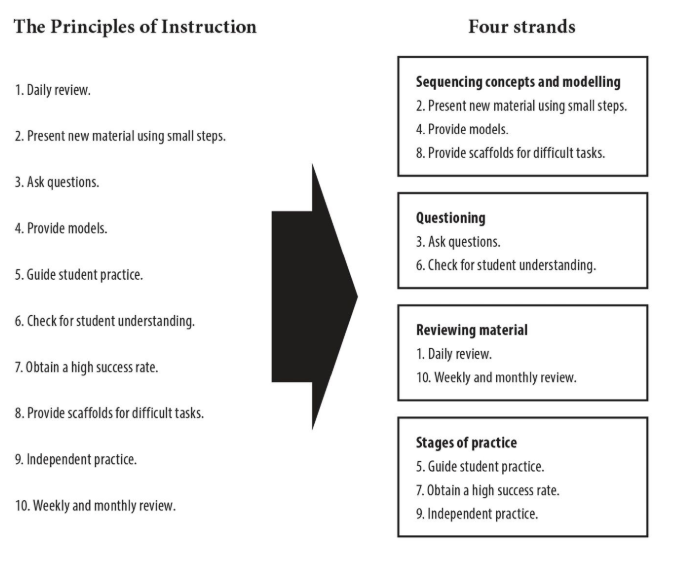
rosenshine-principles-from-TS-book

The four strands “sequencing”, “questioning”, “reviewing” and “practice” are easy to recall, I keep a post-it with those words on nearby when I am planning my curriculum, and pull up Tom’s book on Kindle when I need a reminder of the research.

Rosenshine in the classroom

So how can we implement these principles in the classroom? Specifically, how can we do so in the Computing classroom? This blog will explain some of the practices I employ in my department, with a view to inspiring others to adopt cognitive-science-informed practice in their Computing classrooms.

Sequencing concepts and modelling

I recently refreshed the Computing curriculum right through from KS3 to KS5. That was a tough summer but it was well worth it. I studied the Computing Pathways from CAS (PDF), which is a great starting point, if a bit wordy. From this I produced a curriculum that covered the material in a spiral manner, that is after teaching a topic in one year, we revisit it in more depth in subsequent years. This way a large topic such as Computer Networks is delivered in small steps that build upon each other, such as the www, searching, staying safe online (Year 7), the internet, DNS, devices and topologies (Year 8), packet switching, protocols and cybersecurity (Year 9).

Each lesson has a review of past material (see below), and lots of checking for understanding, and within lessons I try to break down big concepts and provide scaffolds in the form of handouts, books, websites and additional videos for those that need them. When teaching programming, I find the PRIMM model very effective, and this covers the principles of providing models and scaffolds. See below for more on PRIMM.

To be frank, the topic of curriculum design merits a blog post in itself, which I will write another day at mraharrisoncs.wordpress.com. Until then, I recommend this article by Alan O’Donohoe (PDF) in Hello World issue 6.

Questioning

Rosenshine’s principle 3 is “Ask Questions”. All teachers ask questions, sure, but are you asking enough of the right questions, in the right way? Rosenshine makes it clear that questioning is an instructional technique not just a mode of assessment.

I use various techniques including Socratic questioning: deliberately posing questions that require thought and reasoning, sometimes in a sequence, to draw out what a student or a class knows about a topic, enabling them to formalise that knowledge in a sentence or two. For example, on the topic of Storage Devices:

Teacher: “What type of secondary storage would be needed in a missile targeting computer for use on the battlefield?”
Student 1: “Hard Disk Drive”
Teacher: “What do we know about a hard disk drive, how does it store data?”
Student 2: “Magnetic fields”
Teacher: “Yes, and how are those magnetic fields written?”
Student 2: “The disk spins and a read/write head magnetises it”
Teacher: “So what would happen to a HDD in the battlefield?”
Student 1: “It could break, it’s got moving parts, so it’s not HDD, we need a Solid State Drive!”
Teacher: “Why Solid State?”
Student 1: “It’s got no moving parts so it won’t break on the battlefield”
Teacher: “Good. Follow-up question, what type of computer is the missile-targeting computer?”
Student 2: “Embedded, Sir”.
Teacher: “Why?”
Student 2: “Single-purpose, built into another device”.
Teacher: “If the artillery section need to contact HQ, can they do so on the missile-targeting computer?”
Student 1: “No because it’s not general purpose”.

etc…

You can read more about Socratic questioning here and many other places. But we are, of course, in a computer room most of the time, so we can employ digital techniques and tools for both this principle and number 6, “Check for Student Understanding”.

Socrative.com: It’s no accident given my favourite questioning technique above, that I love this service, available as a website at Socrative.com and as an app. I have lots of end-of-unit multiple-choice tests saved in Socrative, and what makes it perfect for summative testing is the “shuffle questions” feature that means adjacent students are usually on different questions making copying much harder.

Socrative also allows me to ask a question to the whole class, and get a free-text response, this is rather like a mini-whiteboard question. But unlike a mini-whiteboard, I can then choose a few of these responses and push them back out to all the students to “vote” for their favourite. It’s excellent for checking for understanding and correcting misconceptions. Socrative is free for basic use but I pay USD$60 annually for the Pro version to have 20 rostered “rooms” to make summative testing easier.

Other recommended tools include Edmodo, Quizizz, Microsoft Forms, Google Forms and Quizlet, I’ll talk more on some of these later.

Reviewing Material

All my lessons begin with a review. Underpinning much of Rosenshine’s principles is retrieval practice: the cognitive science finding that each time a student retrieves some knowledge, such as when being questioned or tested, they are building secure long-term memory which supports future learning.

Like many teachers I once created exciting starters, with the purpose of “engaging” or “hooking” the students into the material. However, these new and thrilling ways to get children excited about ring and bus topologies or the concept of iteration probably didn’t get much return on investment. That time spent planning – and the time spent by the students doing a card sort in the first ten minutes of every lesson – could be better spent simply reviewing previous material, such as through a quick quiz. My practice changed dramatically after reading this blog post by Ben Newmark: “…on why I killed my starters”.

“And make no mistake, ‘starters’ were supposed to be whizzbangy. Laminated card sorts were good. Putting a laminated card sort in an envelope and labelling it “TOP SECRET” was even better. Using police tape to make a classroom look like a crime scene was best practice. […] Two years ago I finally plucked up the courage to stand by my convictions and, as a matter of routine, replaced all my ‘starters’ with ‘reviews’. Fifteen short questions, self-marked. Five on the previous lesson. Five on the topic. Five on anything. A doddle to plan.”
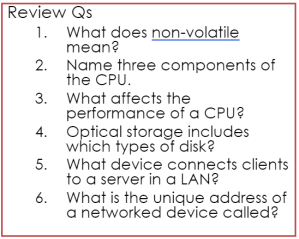
reviewqs1

This “previous lesson / same topic but earlier / any topic” review is sometimes called “Fish / Dog / Elephant” quizzing, because of the supposed relative memory longevity of those creatures. Many of my KS4 starters are just slides with between 5 and 10 questions on them, like this ⇒

I’ve been doing this every lesson since Sep 2018, mixing up the topics but starting every one of the five lessons per fortnight like this, and this has created a class full of Year 11s who can now discuss the core knowledge confidently. As a result their mock exam results are extremely promising.

Again, we have lots of digital tools at our disposal to make this regular retrieval more effective. Here I use the following websites and apps:

  • Edmodo. A free blogging and quizzing website which consists of a “Facebook-like” page where I can post a question and students reply like on social media. Edmodo comes into its own, however, with the quiz feature. I now have around 50 quizzes on all my KS3 topics, so I will post one or two quizzes as a starter, and then another two as homework every lesson. I use this with KS3 primarily as KS4 find it a bit childish.
  • Quizlet. Hugely impressive platform for interacting with core knowledge. I have entered much of the key vocabulary for my curriculum from KS3 to KS5, and the students sign in and study using the various games: Flashcards, Match (like an online card sort :)), Gravity, Learn, Test and “Quizlet Live” – think Kahoot in teams. Quizlet is free for basic use but I recommend the teacher upgrade at £36/year so you can track progress. My own study sets are all available here quizlet.com/WHGSComputing and I am a Quizlet Ambassador if you need any help, message me on Twitter @MrAHarrisonCS.
  • Project Quantum based on Diagnostic Questions and Eedi. A set of thousands of crowdsourced quiz questions arranged into topics, all free. A bit fiddly to set up, I use this mostly for the baseline tests but I am bringing more of the topic tests into my lessons gradually.
  • Teams for Education. We are an Office 365 school, and I love Teams, wherein I can set multiple choice quizzes using Forms, or post digital worksheets in Class Notebook and mark them online. The Assignments feature provides a free digital homework diary and each team has a Sharepoint page with document store. Teams will be the subject of a future blogpost at mraharrisoncs.wordpress.com. If you are a Google school then much of the above is available in GSuite also.

Stages of Practice

Rosenshine’s principles in this group include guide student practice, obtain a high success rate, and independent practice. In our subject, Computing, nothing fits these principles better than the “PRIMM” model for teaching programming, which I use across the secondary key stages.

PRIMM stands for Predict, Run, Investigate, Modify, Make, and it is explained here by the creator Sue Sentance, with sample resources you can download and use for teaching Python programming. It works because it follows the model of learning we employed when we learned to write: we learned to read first, then copy letters, then copy words, then write new words. PRIMM is an extension of the simpler Use, Modify, Make strategy described here (PDF).

This process, supported by a knowledgeable teacher, covers the three above principles well. While students are predicting, investigating and running, the material is providing models (R4), while both the teaching material and the teacher are guiding student practice (R5). Simple modifications to the code allow students to obtain a high success rate (R7), by making use of scaffolds (R8), and by the time they are at the make stage they are able to perform independent practice (R9).

Summary

Rosenshine’s Principles can make a busy teacher more effective, helping us get great results by understanding what works according to cognitive science. In the computing classroom we can really make the most of this research, using digital tools to automate and facilitate some of the processes, and therefore reduce workload yet achieve some amazing outcomes for our students.

Categories
Uncategorized

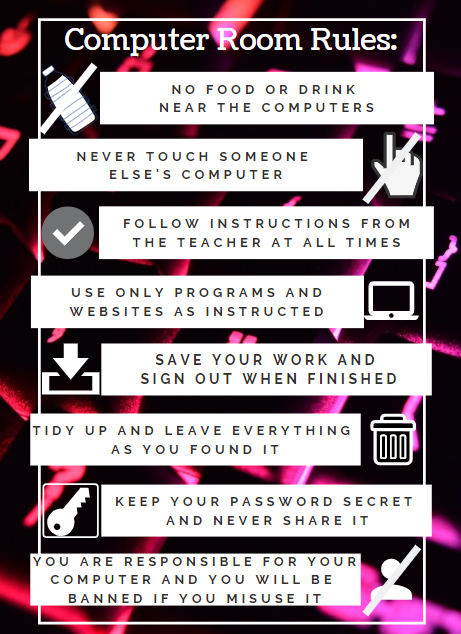
Computer Room Rules poster

I use Canva for posters for my wall, I find it quicker than desktop applications. Here is one I made today that seems popular on Twitter.

Canva link here, PDF for download attached here: Computer Room Rules

canva-computer-room-rules.png

Categories
Uncategorized

The sum of things to be known is inexhaustible

As Head of Department I usually send a weekly update email to the team on a Sunday evening covering the things they need to know e.g. what’s on the teaching plan, deadlines and meetings. NB I have no expectation that this should be read at the weekend, it just suits me to do it then. I am starting each update with a thought or inspiration. I may occasionally blog them. Here is today’s:

Recently I have been getting into poetry, and I can recommend an audio book called The Poet’s Corner by John Lithgow (The 3rd Rock actor). It’s a fab introduction to poetry and really inspirational. A.E. Housman, author of “A Shropshire Lad” which beautifully captured the pain of growing up, gave a speech on taking up his post as Professor at UCL: “The sum of things to be known is inexhaustible, and however long we read, we shall never come to the end of our story-book.” I’ve put this on a poster in my room as I think it sums up my joy of life-long learning. Find it on Canva here.