Categories
computing physical teaching and learning tech

Physical Computing Intro

Physical Computing provides engaging, relevant, and inclusive learning experiences and helps develop programming skills while being creative and collaborative. Code makes something happen in the real-world, not just on a screen. Learners (particularly girls) find physical computing engaging.
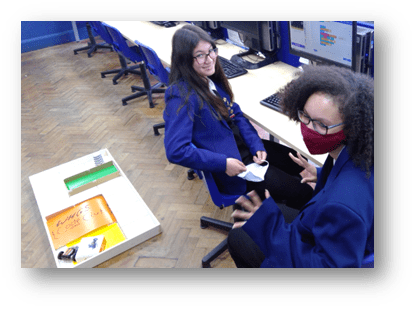
Two Year 9 girls are, sitting near a wooden rectangular arena containing a BitBot microbit buggy. They are in a classroom. One is smiling while wears a facemask but is making "jazz hands"!
The Bit:Bot buggy allows code to make something happen.

Physical computing devices take some time to set up, and can add complexity and behaviour challenges to a lesson, so take some time to think through these before using them in class.

Getting Started

  • Start small. Focus on a small cohort, maybe an after-school club, until you get up to speed.
  • Use the training and support available, there are physical computing courses on TeachComputing.org and help is available from your hub
  • Choose a device and activity based on context, setting and need.

There are five main categories of device, and the most common are listed below:
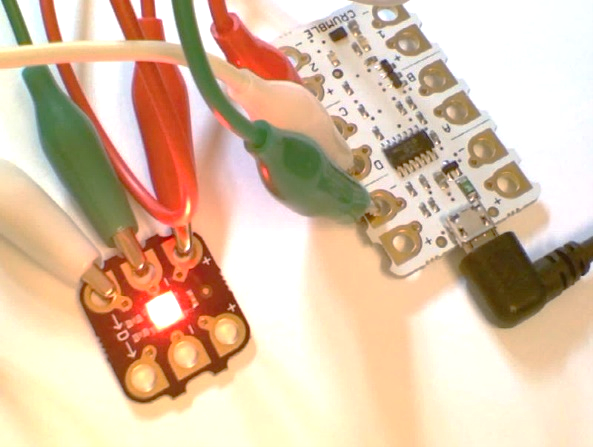
Close up of a Crumble - a small white circuit board - with crocodile clips connecting it to a Sparkle - a smaller board with a neopixel LED on it. The LED is lit up red.
Crumble is an “Embedded Board”
  1. Packaged Electronics such as “Snap Circuits” – these require a lot of electronics knowledge and are best suited to DT projects.
  2. Packaged programmable products: Sphero, Bee-Bot, Lego WeDo/Mindstorms and VEX are simple to set up and get you straight to the programming, good for Primary settings.
  3. Peripheral boards such as the MaKey MaKey connect to a computer to add interactivity, but cannot be unplugged and run standalone. Simple and fun!
  4. Embedded boards like the Micro:Bit, Crumble and Raspberry Pi Pico have a microprocessor onboard that you program via a computer, but they then run the program independently, so can be disconnected. Use these to control buggies, create musical instruments, name badges and weather stations…
  5. General purpose boards like the Raspberry Pi 3, 4, Zero W and W2 are actually whole computers that run a full Linux-based GUI operating system. You connect one to a monitor, mouse and keyboard and use it like a computer, but it has lots of interfaces for connecting electronic equipment. You can do almost anything with a Pi, but the learning curve is steeper than the above devices. They run Scratch, Sonic Pi and Minecraft with a Python interface, so you can write “mods”, or connect a camera to make a digital photobooth, the possibilities are limitless!
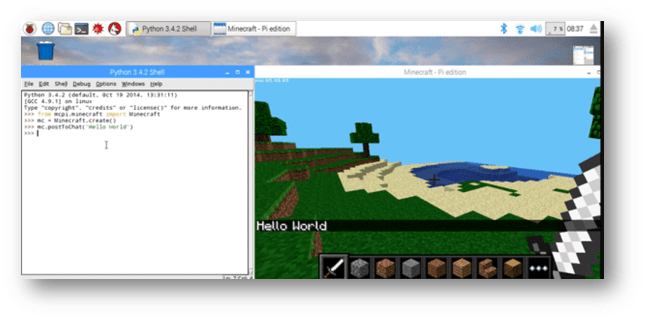
Screenshot of Raspberry Pi showing a Python window on the left and Minecraft on the right. The code says "mc.PostToChat("Hello World") and in the Minecraft world the chat message "Hello World" is visible.
Minecraft Pi comes with a Python interface where students can write their own Mods!
Advertisements

Next steps

  1. Book onto some Physical Computing CPD at teachcomputing.org/courses
  2. Choose a device and an activity – see the teachcomputing.org/curriculum or the Raspberry Pi projects website: projects.raspberrypi.org
  3. Contact a nearby Computing Hub to request a loan of a physical computing kit
  4. Try it out in a small group like your own after-school club, a Code Club or Coder Dojo, then introduce to your classes!

This blog was based on material from the NCCE. Visit blog.teachcomputing.org/quick-read-physical-computing to find out more about physical computing, or read the other principles at teachcomputing.org/pedagogy. And subscribe to Hello World to read much more about computing pedagogy every two months: helloworld.raspberrypi.org.

And if you like this post, remember to thank me with a coffee, and then go and buy one of my books, “How to Teach Computer Science” is packed with teaching ideas like this. Thanks!

If you are grateful for my blog, please buy my books here or buy me a coffee at ko-fi.com/mraharrisoncs, thanks!
Categories
#LEARN computing HTTCS teaching and learning Uncategorized

Two chances to win #htLEARNCS!

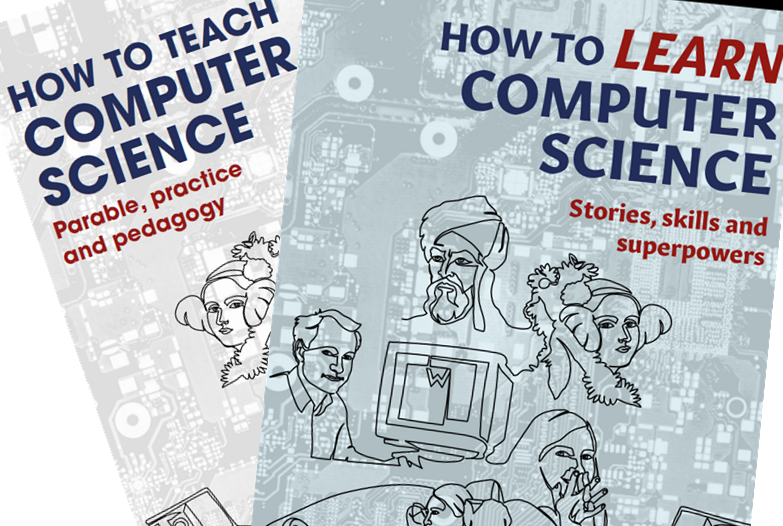
My new book “How to LEARN Computer Science” is out now, at Amazon and JohnCattEd, and you have a two chances to get hold of a free copy…

  1. Like and Retweet my tweet here or Like my Facebook post here or here, or my LinkedIn post here. This will enter you into the prize draw and SIX winners will receive a free copy.
  2. BOGOF! Send proof of purchase of my first book “How to Teach Computer Science” dated today or later, and I will send you a free copy of #htLEARNcs (limited to the first SIX applications).
Screenshot of Amazon web page showing book for sale "How to Learn Computer Science"
Book now available in Amazon and at the publisher John Catt Ed

I’m very excited about this book, and hope your students are too. It will be available soon on the Hachette store too, thanks to JC’s deal with them, and bulk discounts for your class will be possible. So why not get a copy for yourself now? The foreword is written by my good friends Craig Sargent and Dave Hillyard of Craig’n’Dave and I am very humbled to have had their support during the creation of the book, and their wringing endorsement on page 1.

Advertisements

Thanks for your support!

Categories
computing teaching and learning

htLEARNcs. OUT THIS SEPTEMBER.

Cover Reveal…

How to LEARN Computer Science is coming soon. Publication date is set for September 1st. htLEARNcs contains all the good stuff from the first book (How to Teach Computer Science, available here) that is relevant to an audience of GCSE students themselves, and I’ve added lots of new content. You can read all about the content on my previous blog here.

Advertisements

As I said earlier, I have kept the new book as faithful to the old book as possible, so teachers can use HTTCS for their own benefit, while recommending (dare I say buying 🙂 ) htLEARNcs for their students.

Teachers can set a chapter of htLEARNcs for homework, or just one of the activities each week. A few copies in the classroom could be used as “stretch” activity resources, and aspirational parents can buy it for their children.

If you are grateful for my blog, please buy my books here or buy me a coffee at ko-fi.com/mraharrisoncs, thanks!

I’ll keep you posted on the progress towards publication. But it’s great to see this second book coming together! If you haven’t got hold of the first book yet, it’s still just £11.55 on Amazon at time of writing.

Categories
computing physical teaching and learning

Escape the Room – updated 2023

Update 28 November 2023

If you’re looking for an activity for Christmas and have around £100 to spend, you can create a Computer-Science-themed “Escape the Room” challenge (actually more of an “Open the Box”) which you can use again and again. This year I’ve been through the resources and updated the links to the hardware you need to buy and the prices, and it’s striking how much more expensive everything is since I first created this resource. Back in 2018 it all cost £74, now the same items come to about £135! Feel free to adapt as necessary e.g. swap out the directional padlock for a standard numeric one (and change the related clue) to save about £20.

All the files are here on my Onedrive including a PowerPoint which contains full teacher instructions, the student instructions and the printable clues and reference posters. You will also find the Morse code wav file and an editable “bitmap” spreadsheet for creating different bitmap clues (if you want to run this again).

Original post follows from 2019.

Big thanks go to Claire Wicher (@GirlGeekUpNorth) for her resource which gave me a starting point, and I’ve kept in a lot of her content. Claire’s lesson was intended to fit into a standard 50-60 minute lesson, with preamble and review, hence it was too short for my purposes. This one should take 1-2 hours depending on ability and how much help you give them.

#escape

The slides are largely self-explanatory. If you open the Powerpoint you will find instructions and an inventory of parts. The objective is to open a chest by solving puzzles which reveal combinations for the six locks. There’s a twist at the end though, just for laughs and that extra feeling of achievement.

I hope you enjoy this free resource, and if you want to thank me you know what to do…

If you are grateful for my blog, please buy my books here or buy me a coffee at ko-fi.com/mraharrisoncs, thanks!
Categories
teaching and learning

Computer Science “Hinterland” Book

Prompted by this post by Tom Sherrington on Twitter and after much discourse about Cultural Capital and its importance in raising attainment of disadvantaged pupils, I got to thinking… maybe I could pull together a “Hinterland of Computing” book to assist teachers and curious students alike understand the history, implications and future of the fascinating topic of Computer Science. 

So I have started. This blog post will evolve and may be followed up by others, but it’s a starting point for my thoughts on the subject. I really need lots of help, so comment below or on my Twitter feed if you have anything to contribute.

I see this being completed in the Summer of 2020 so hopefully published by Christmas 2020, but that may change as I have not published a book before 🙂

My plan is to write a chapter on each topic, based on typical GCSE specifications. In each chapter I would discuss the history of the topic, with interesting stories, discuss the current status and how real-world experiences link to the topic, cross-curricular links and cross-topic links, then cover the future direction, implications and ethical issues, and finish with some inspiration for the classroom, suggested lesson plans and further reading.

For example, the topic on Systems Security might discuss the history of Cryptography from the Caesar Cipher to Elliptic Curve, stories of computer viruses from Creeper to WannaCry, why passwords are the worst way to authenticate yourself (apart from all the others). Everything will link back to GCSE specs and be clear on what students need to know, but the reader will now have lots of background knowledge with which to illuminate the content and hopefully make lessons more interesting, and pass on that Cultural Capital we are all now aware is so important.

Please let me know if you want to help, feedback is very welcome. I’m gathering background reading at the moment so post comments below or message me on Twitter thanks!

Categories
behaviour teaching and learning Uncategorized

Loyalty Card for positive behaviour management

I took this idea from my teaching coach, and I’ve started trying it this week. Basically they get a stamp for a good lesson. Targets are on the form, all three must be met for a stamp. Lesson 1 today saw around one-third of the class get a stamp, but they all wanted one, so maybe lesson 2 will be different! Feel free to adapt and share onwards with no restrictions.  Download link is below. NB the headphones mentioned are from Poundland, don’t tell the kids! 🙂 loyaltycardimage

loyalty card v1

Categories
coaching computing teaching and learning Uncategorized

Going for Gold

Update Feb 2023. This early blog post reflects my thinking at the time on differentiation, guided by my coaches and mentors at the time. It does not reflect what I consider good practice today, and I leave it here as a record of how my thinking has changed.

See Alex Quigley on Adaptive Teaching for a more evidence-informed contemporary approach. 

Original blog post follows:

The NQT support at this school is excellent, and I’m taking advantage. Not only do I have a standard induction programme including NQT mentoring and CPD but… a Senior Management Team (SMT) link person designated to me, plus optional extra CPD and coaching. The latter means I get an informal 15-minute observation and 15-minute debrief, every week. This is almost as much mentoring as I was getting last year on ITT, and it’s incredibly useful. I’m going to share some recent coaching with you.

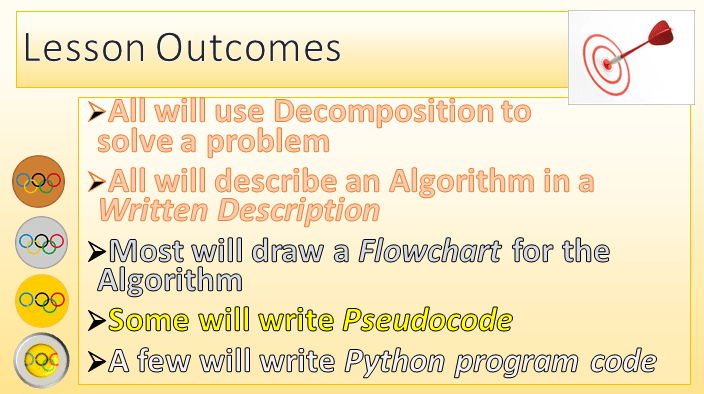
The target this week was Learning Objectives and Outcomes. My coach, Andy – an assistant head whose subject is PE – wanted me to put more effort into designing the outcomes and sharing them with the class. Also, they must be clearly graded and I should communicate the grade of outcome to the students, with reference to their target grade. I’m not sure if it was because Andy is a sports coach or just because Rio 2012 has just ended, but I decided to place bronze, silver and gold medals on my slides and worksheets! The idea being that the bronze medal work should be achievable by all, the silver by some, and the gold by a few top-target pupils.

The topic was Decomposition and Algorithm Design. The task was to decide what makes a strong password (itself a side-learning point), decompose this problem into small steps (must be memorable but not guessable, build it up from two or three components unrelated to each other such as colour, animal and number…) and then write an algorithm to create it. I wanted them to write the algorithm in four different ways: English, Flowchart, Pseudocode and, finally, Python. With slides and an example of each on a worksheet I had plenty of scaffolding, but I thought that getting as far as Pseudocode would be a stretch in 60 minutes, so I invented a Platinum medal for the actual coding. I needn’t have bothered.

The “medal effect” as I am now calling it was amazing. Everyone wanted a Gold or Platinum medal (even though they didn’t actually exist as medals, they were purely notional!). Here is the LO slide:

los

I asked the class to decide what medal they were going to aim for. Not one said bronze! So off we went, and in under an hour, 17 of 26 had written some code to generate strong passwords. Here is a sample program, from a student targeting a GCSE grade 6. She had already written the flowchart and pseudocode…

IMAG0263.gif

I am a convert to the “medal effect”. The next stage may be to include the students in the actual target setting. Perhaps I’ll have them write the outcomes and place the medals next time?